Waiting zones
A waiting zone is where robots wait while a capacity zone is full. Without one, a robot waits at the capacity zone’s entry, where it can block other robots. With one, it waits out of the way.
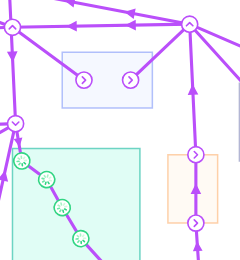
How waiting zones work
- A robot arrives at the entry of a capacity zone that has reached its vehicle limit.
- Meili sends it to a free station in a waiting zone linked to that capacity zone, choosing the closest one.
- When there is room in the capacity zone, the robot drives back to the entry and continues its mission. If several robots are waiting, they go in order of mission priority.
If room frees up while the robot is still on its way to the waiting zone, it turns back straight away.
Create a waiting zone
Create the capacity zone first, then:
- In the Map editor, click Add zones on map in the side toolbar and choose the Rectangle tool.
- Select Waiting zone as the Type and fill the settings:
- Zone vehicle limit: the number of robots that can wait in the zone at the same time.
- Associated capacity zone: the capacity zones this waiting zone serves. You can choose more than one.
- Click
Create zoneand draw the zone on the map.
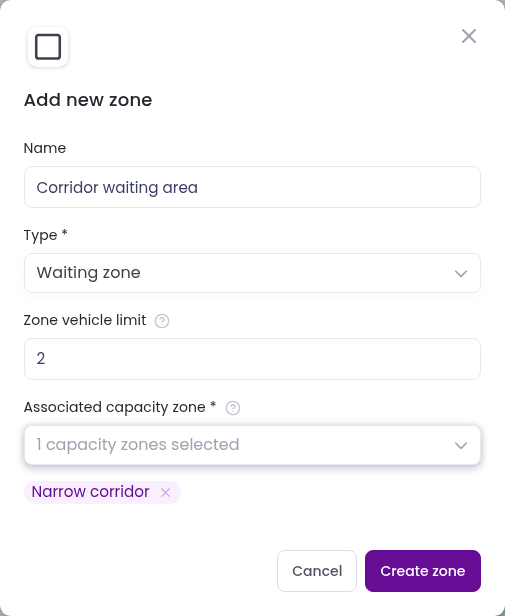
Meili creates one waiting station for each robot in Zone vehicle limit, spread evenly inside the zone and named Waiting Station 1, Waiting Station 2 and so on. Connect each waiting station to your path network, so robots can reach it and leave it. See Stations and paths.
When you delete a waiting zone, its waiting stations are deleted with it.
For the general steps to add and edit zones, see Zones.