Charging
Meili FMS can keep your robots charged without anyone sending them to a charger. Based on each robot’s battery, it decides when the robot needs to charge, picks a charger for it, and makes it available for missions again once it has enough battery.
This page explains how that works. The settings themselves are described on the pages linked below.
What you need to set up
- Charging zones on the map, linked to your physical chargers. This is also where you set the docking and undocking routines. See Charging zones.
- Battery management turned on for each robot, with its battery levels. See Vehicles: Battery settings.
- Resting zones, recommended. Robots use them to wait when all chargers are busy and to free a charger once they have charged. See Resting zones.
Robots without battery management turned on are never sent to charge automatically.
How the battery levels work together
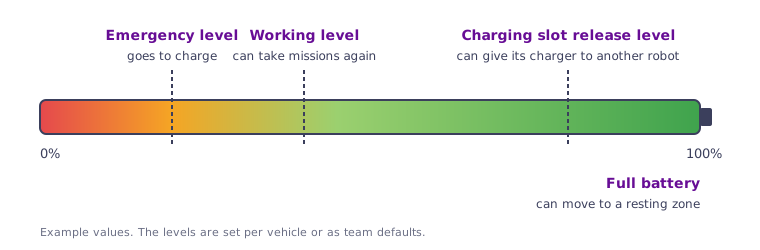
- Below the Emergency battery level, the robot needs to charge. It finishes its current mission. It won’t be assigned new missions until it has charged enough.
- Once it reaches the Working battery level, it can take missions again.
- Above the Charging slot release level, it can hand its charger over to a robot that needs it more.
- At Full battery, it can leave the charger for a resting zone.
Instead of an emergency battery level, you can set an Emergency distance. The robot then goes to charge when the distance it can still travel drops to that value. Use one or the other, not both.
Team defaults
To avoid entering the same levels for every robot, set them once for the whole team. Open Team site settings from the profile menu, click Site settings and open the Battery tab. Then, in each robot’s battery settings, turn on Use team default settings.
When a robot goes to charge
A robot is sent to a charger when:
- Its battery reaches the emergency level. If it is in the middle of a mission, it finishes the mission first. Until it has charged, it gets no new missions.
- It doesn’t have enough battery for a mission. Before giving a mission to a robot, Meili estimates how far the robot can still travel. If the robot couldn’t finish the mission and still keep its emergency reserve, it isn’t chosen. If the mission was assigned to that robot specifically, the robot goes to charge first.
- It has been idle for a while and Move to charging zone after timeout is turned on in the site settings. Otherwise, idle robots go to a resting zone instead. See Site settings.
How the charger is chosen
Meili only considers chargers that:
- accept the robot’s vehicle category,
- are not full (each charging zone has a vehicle limit), and
- are not already reserved by another robot.
If any of these chargers has a Priority higher than 0, the one with the highest priority is chosen. Otherwise, Meili chooses the closest one along the robot’s route. Chargers on other floors of the team are also considered.
When all chargers are busy
- If Enable charging slot release is turned on, Meili looks for a charging robot whose battery is above its charging slot release level. That robot moves to a free resting station and the waiting robot takes its charger. This only happens if a resting station is free.
- Otherwise, the robot goes to a resting zone and waits there until a charger becomes free.
When a robot leaves the charger
- Missions: as soon as the battery reaches the working level, the robot can be assigned missions again. When it gets one, it runs the charging zone’s exit routine, if there is one, and drives to the mission.
- Fully charged: if Move to resting zone when charge is turned on in the site settings, the robot moves to a resting zone, freeing the charger for others. Otherwise, it stays on the charger until it gets a mission.