WebSocket and MQTT clients
The meili-sdk provides two clients to communicate with the FMS in real time: MeiliWebsocketClient and MeiliMqttClient. Both manage the connection, message sending and receiving, and use the same callback functions to handle events and messages from the FMS. They are the recommended way to integrate your robots with the FMS, independent of the robot’s way of communication.
The idea is to create a script that acts as a bridge between the FMS and your robot’s control system. This script should communicate with the robot using its native protocol and with the FMS using one of the clients, so as status updates and commands can be exchanged.
The only differences between the two clients are the communication protocol and how they authenticate. MQTT is more lightweight, but WebSocket might be more robust. Choose the one that matches the communication channel configured for your fleet (
WS_SDKorMQTT_SDK).
Importing
from meili_sdk.websockets.client import MeiliWebsocketClientfrom meili_sdk.websockets.mqtt_client import MeiliMqttClientAuthentication
Provide the fleet token when creating the MeiliWebsocketClient instance. You can find the fleet token in the FMS, searching for your fleet and looking for the ‘password’ field.
client = MeiliWebsocketClient(
    token="fdd27e8e1a2b4c3d8e9f0a1b2c3d4e5f",
    ... # Callbacks here
)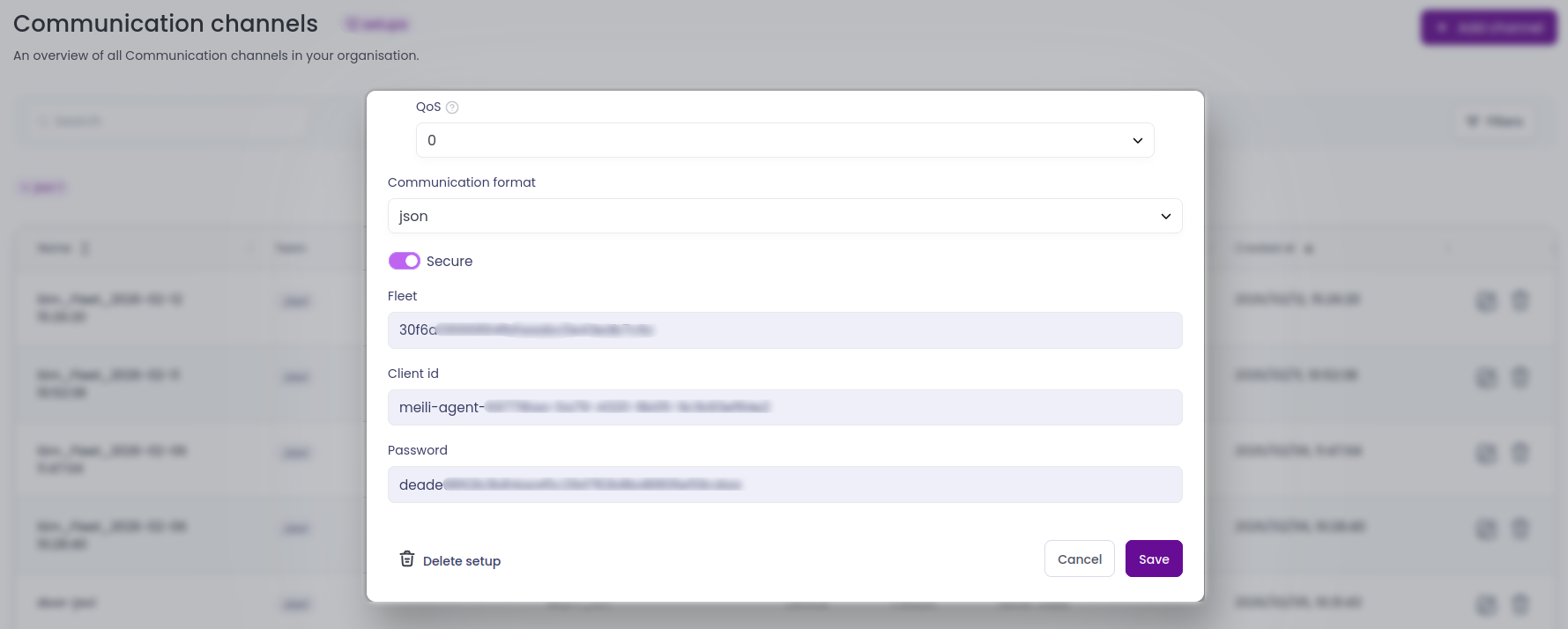
Provide three identification parameters, which can be found on Channel details on the Communication channels page:
client_id: Corresponds to the fieldClient id. Should start withmeili-agent-....token: Corresponds to the fieldPassword.fleet_uuid: Corresponds to the fieldFleet.
client = MeiliMqttClient(
    client_id="meili-agent-XXXXXXXXX-XXXX-XXXX-XXXX-XXXXXXXXX",
    token="fdd27e8e1a2b4c3d8e9f0a1b2c3d4e5f",
    fleet_uuid="7935baee221644a9b3aa19fca7fabe99",
    ... # Callbacks here
)
Callback Functions
When creating either client, you can provide any combination of the following callback functions. Each is called when a specific event or message is received from the FMS:
open_handler: Called when the connection is established.close_handler: Called when the connection is closed.error_handler: Called when an error occurs.task_v2_handler: Called when a new task is assigned.task_cancellation_handler: Called when a task cancellation message is received.slow_down_handler: Called when a slow down message is received.path_rerouting_handler: Called when a path rerouting message is received.collision_clearance_handler: Called when a collision clearance message is received.message_error_handler: Called when a message error occurs.update_map_handler: Called when an update map message is received.vehicle_initial_position_handler: Called when a vehicle initial position message is received.update_vehicle_settings: Called when vehicle settings are updated.pause_task_handler: Called when a pause task message is received.resume_task_handler: Called when a resume task message is received.remove_vehicle_from_fleet_handler: Called when a vehicle is removed from the fleet.set_initial_position_handler: Called when a set initial position message is received.update_map_id_handler: Called when an update map ID message is received.topic_list_handler: Called when a topic list message is received.topic_list_initializer_handler: Called when a topic list initializer message is received.docking_routine_request_handler: Called when a docking routine request message is received.docking_routine_finalize_handler: Called when a docking routine is finalized.
You only need to implement the callbacks relevant to your application.
Example of a basic client implementation
from meili_sdk.websockets.client import MeiliWebsocketClient
from meili_sdk.websockets.models.task_v2 import TaskV2

def open_handler():
    print("Connection opened")

def close_handler():
    print("Connection closed")

def error_handler(_, error):
    print(f"Error: {error}")

def task_v2_handler(self, task: TaskV2, vehicle_uuid: str):
    print(f"Received task: {task} for vehicle: {vehicle_uuid}")
    send_task_to_robot(task, vehicle_uuid) # Your task handling logic here

client = MeiliWebsocketClient(
    token="fdd27e8e1a2b4c3d8e9f0a1b2c3d4e5f",
    open_handler=open_handler,
    close_handler=close_handler,
    error_handler=error_handler,
    task_v2_handler=task_v2_handler,
)

client.add_vehicle("afe4b5c6d7e8f9a0b1c2d3e4f5g6h7i8j") # FMS vehicle UUID
client.run_in_thread()from meili_sdk.websockets.mqtt_client import MeiliMqttClient
from meili_sdk.websockets.models.task_v2 import TaskV2
def open_handler():
print("Connection opened")
def close_handler():
print("Connection closed")
def error_handler(_, error):
print(f"Error: {error}")
def task_v2_handler(self, task: TaskV2, vehicle_uuid: str):
print(f"Received task: {task} for vehicle: {vehicle_uuid}")
send_task_to_robot(task, vehicle_uuid) # Your task handling logic here
client = MeiliMqttClient(
client_id="meili-agent-XXXXXXXXX-XXXX-XXXX-XXXX-XXXXXXXXX",
token="fdd27e8e1a2b4c3d8e9f0a1b2c3d4e5f",
fleet_uuid="7935baee221644a9b3aa19fca7fabe99",
open_handler=open_handler,
close_handler=close_handler,
error_handler=error_handler,
task_v2_handler=task_v2_handler,
)
client.add_vehicle("afe4b5c6d7e8f9a0b1c2d3e4f5g6h7i8j") # FMS vehicle UUID
client.run_in_thread()Message Sending
Both clients let you send various message types to the FMS to report robot status and events. Below are the main message types you can use:
Location
Report the robot’s current position. Supported formats:
- Meters:
xm,ym - Latitude/Longitude:
lat,lon - ROS Coordinates:
x,y
message_loc = Message(
    event=constants.EVENT_LOCATION,
    value={"xm": 1, "ym": 2, "rotation": 90, "map_id": "first_floor"},
    vehicle=uuid
)
message_loc.validate()
client.send(message_loc)
Speed
Report the robot’s speed in meters per second.
message_speed = Message(
    event=constants.EVENT_SPEED,
    value={"speed": 0.5},
    vehicle=uuid
)
message_speed.validate()
client.send(message_speed)
Battery
Report battery percentage and charging status.
class PowerSupplyStatuses:
    DISCHARGING = 2
    NOT_CHARGING = 3

message_battery = Message(
    event=constants.EVENT_BATTERY,
    value={"value": 81, "power_supply_status": PowerSupplyStatuses.NOT_CHARGING},
    vehicle=uuid
)
message_battery.validate()
client.send(message_battery)
Goal Status
Update the status of a mission or task.
class GoalStatuses:
    ACTIVE = 1
    SUCCEEDED = 3
    ABORTED = 4

message_goal = Message(
    event=constants.EVENT_GOAL_STATUS,
    value={"goal_id": "fms_task_uuid", "status_id": GoalStatuses.ACTIVE},
    vehicle=uuid
)
message_goal.validate()
client.send(message_goal)
Notification
Send notifications to the FMS interface. Levels: info, warning, error.
message_notification = Message(
    event=constants.EVENT_NOTIFICATION,
    value={"level": "error", "message": "Lost communication"},
    vehicle=uuid
)
message_notification.validate()
client.send(message_notification)
State
Send a combined update of location, speed, and battery.
location = {"xm": 1, "ym": 2, "rotation": 90, "map_id": "first_floor"}
speed = {"speed": 1.5}
battery = {"value": 82, "power_supply_status": PowerSupplyStatuses.NOT_CHARGING}
message_state = Message(
    event=constants.EVENT_STATE,
    value={"location": location, "speed": speed, "battery": battery},
    vehicle=uuid
)
message_state.validate()
client.send(message_state)
Map Update
Send updates to the map, such as new stations.
message_map = Message(
    event=constants.EVENT_MAP_UPDATE,
    value={
        "stations": [
            {
                "uuid": "ff2a1b1c1e5d4f0c9f3d1234567890ab",
                "title": "Station 1",
                "station_type": "default",
                "points_in_meters": [1, 0],
                "rotation": 0.0
            },
            {
                "uuid": "aa3b2c3d4e5f67890abcdef123456789",
                "title": "Station 2",
                "station_type": "default",
                "points_in_meters": [1, -1],
                "rotation": 0.0
            }
        ],
    },
    vehicle=uuid
)
message_map.validate()
client.send(message_map)
As a result, the FMS will update its map with the new stations provided in the message and send back a confirmation message, indicating the UUIDs assigned to the stations. This will be handled by the update_map_handler callback if implemented.
Synchronization
When the user sends a synchronization request via the FMS, update_map_handler is triggered, the message contains the current map configuration, available actions, stations, paths, and presets. Key fields include:
action_definitions: List of actions the robot can performstations: Map stations with coordinatespaths: Connections between stationspresets: Predefined action sequencesdisplayable_image,height,width: Map image and dimensionsyaml_file: Map configuration detailsuuid: Map identifier
This message provides all necessary information for the robot agent to operate and interact with the FMS.