Action zones
Action zones run mission presets automatically when a robot enters or leaves an area. For example, they can open a door as a robot approaches it and close it once the robot has gone through.
Create an action zone
- In the Map editor, click Add zones on map in the side toolbar and choose the Line tool or the Rectangle tool.
- Select Action zone as the Type and fill the settings described in Action zone settings.
- Click
Create zoneand draw the zone on the map, across the paths where the presets should run.
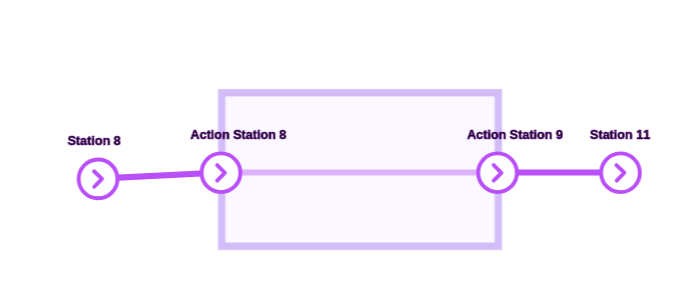
Where the zone crosses a path, Meili creates two action stations: one where robots enter the zone and one where they leave it. Robots run the presets at these stations.
To change the settings later, click the zone on the map.
Action zone settings
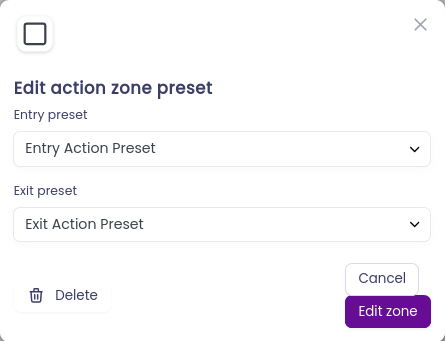
- Entry preset (optional): the mission preset the robot runs when it enters the zone. It runs every time the robot enters, and the robot waits at the entry action station until the preset is finished.
- Exit preset (optional): the mission preset the robot runs when it leaves the zone. It runs every time the robot leaves, and the robot waits at the exit action station until the preset is finished.
- Zone distance threshold (meters): if the entry preset contains an action for an IoT device, such as opening a door, the action starts as soon as the robot is within this distance of the zone. The device then has time to get ready before the robot arrives. Leave it at 0 to start the action when the robot reaches the zone.
The stations set in the mission preset are replaced by the zone’s action stations when the preset runs. Which action station is used depends on whether the robot is entering or leaving the zone.
How action zones work
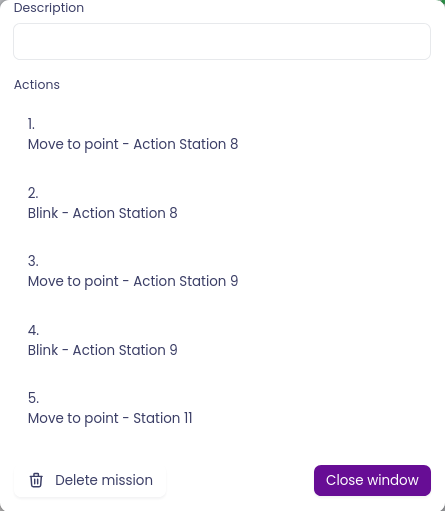
When a mission’s route passes through an action zone, Meili adds the zone’s entry and exit presets to the mission automatically.
For example, take an action zone between Station 8 and Station 11 whose entry and exit presets both make the robot blink its lights. When you send a robot from Station 8 to Station 11, the mission looks like this:
Action zones are particularly useful with IoT devices. Create an entry preset that opens a gate or door and an exit preset that closes it, and Meili opens and closes it automatically whenever a robot goes through.
For the general steps to add and edit zones, see Zones.