Buffer zones
A buffer zone turns a row of stations into a queue. Robots move through the stations one at a time, and only drive on to the next station when it is free, like cars waiting at a traffic light. Use buffer zones where robots often arrive at the same time, for example in front of a loading dock or before a capacity zone.
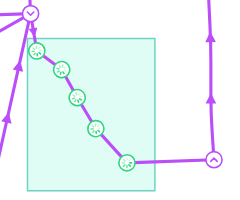
How buffer zones work
Every station inside a buffer zone becomes a buffer station. When a robot’s route passes through buffer stations, Meili adds a stop at each of them to the robot’s mission, in the order they appear along the route. The robot only moves on to the next buffer station once that station is free, so robots keep their place in the queue.
Queuing relies on station locking, which is on by default. See the station locking settings in Site settings.
Follow this recommended setup for buffer zones:
- Robots should pass through only one buffer zone on their way to the destination station.
- The paths in the buffer zone should be one-way: uncheck Bidirectional in the Path settings.
If your setup differs from this, buffer zones may not work as expected.
Create a buffer zone
- Create the stations of the queue and connect them with paths. See Stations and paths.
- In the Map editor, click Add zones on map in the side toolbar and choose the Line tool or the Rectangle tool.
- Select Buffer zone as the Type and fill Zone vehicle limit, the maximum number of robots allowed in the zone.
- Click
Create zoneand draw the zone around the stations.
The stations inside the zone become buffer stations straight away. If you resize the zone, stations that end up outside it become normal stations again. When you delete a buffer zone, its stations stay on the map as normal stations.
For the general steps to add and edit zones, see Zones.