Evacuation zones
Evacuation zones are safe areas, out of the way of people and emergency exits, where your robots go when someone presses the emergency stop.
When the emergency stop is pressed, Meili fails every mission that hasn’t finished and sends each connected robot to the closest free station inside an evacuation zone. Robots that can’t use any evacuation station, for example because the team has none, aren’t sent anywhere.
The emergency stop is the red stop button at the top right of the dashboard. To resume work, click it again and confirm.
Create an evacuation zone
- In the Map editor, click Add zones on map in the side toolbar and choose the Line tool or the Rectangle tool.
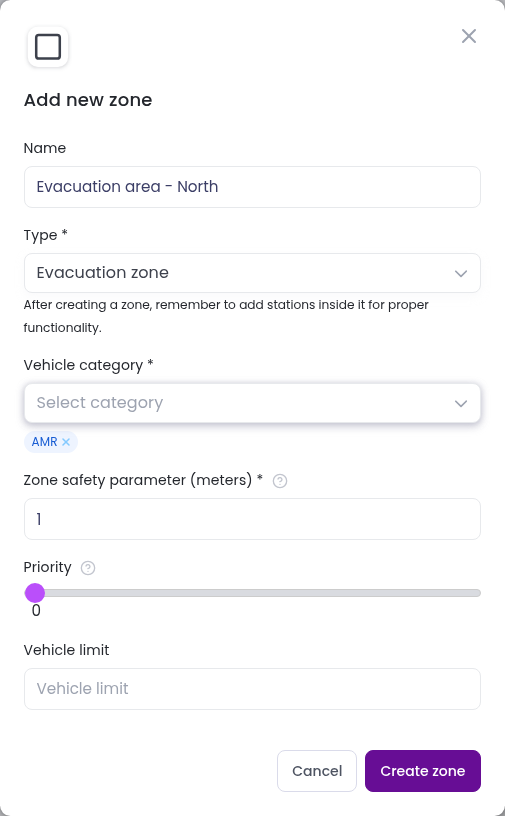
- Select Evacuation zone as the Type and fill the settings:
- Vehicle category: the categories of robots that can use the zone. Choose at least one.
- Zone safety parameter (meters): a margin, in metres, around the zone.
- Priority: makes this zone preferred over evacuation zones with a lower priority.
- Vehicle limit: the number of robots that can be sent to the zone at the same time.
- Click
Create zoneand draw the zone on the map.
Add evacuation stations
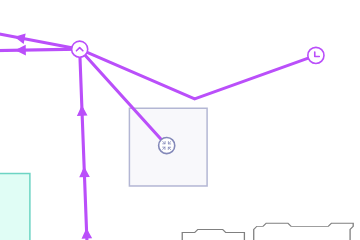
An evacuation zone needs stations inside it, one for each robot you want to park there. Robots drive to these stations, so connect each one to your path network.
Create the stations as usual (see Stations and paths), inside the zone. They become evacuation stations automatically, are named Evacuation Station 1, Evacuation Station 2 and so on, and only accept the zone’s vehicle categories.
When you delete an evacuation zone, its stations are deleted with it.
For the general steps to add and edit zones, see Zones.