Mission presets
A mission preset is a mission saved as a template, for example “go to Dock 2, wait for the pallet, go to the packing station”. Once saved, you can run it with one click from the Missions page, put it on a schedule, or launch it from a trigger.
To open the list, go to Actions inside your team and select the Mission presets tab.
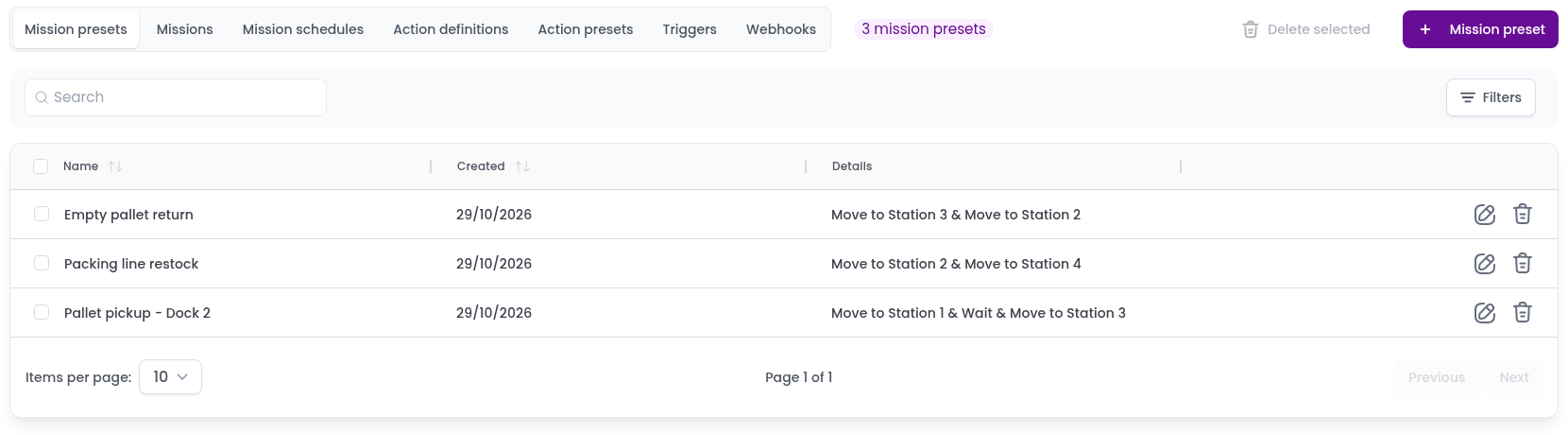
Each row shows the preset’s Name, the date it was Created and its actions under Details. To find a preset, type part of its name in Search, or click Filters to show only the presets that use certain vehicles or stations.
Create a mission preset
- Click
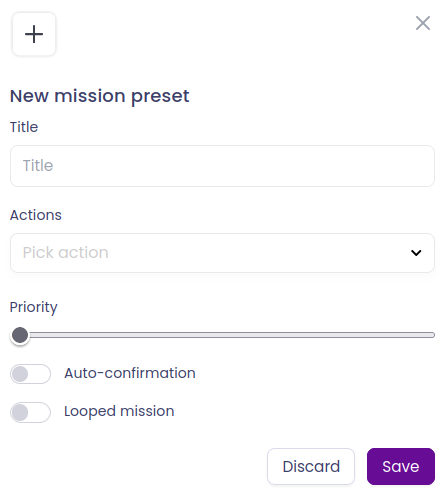
+ Mission preset. The New mission preset dialog opens. - Fill the form:
- Title: a name that describes the mission, for example Pallet pickup - Dock 2.
- Actions: pick an action from the list to add it. You can pick an action definition or an action preset. Fill the fields each action needs, such as the station. Actions are carried out in the order you add them. Each action has its own Auto-confirmation switch (see Mission confirmation), and you can remove it with the bin icon.
- Autogenerate movement: adds the movements between actions for you. See Autogenerated movement.
- Vehicle category (optional): only robots of this category can run the mission.
- Robot (optional): the robot that runs the mission. If you leave it empty, Meili picks one.
- Priority: missions with a higher priority run first.
- Auto-confirmation: when on, every action is confirmed automatically when the robot finishes it.
- Looped mission: when on, the mission starts again each time it finishes.
- Click
Save.
You can also save a mission as a preset while you create it on the Missions page, with Save as a new mission preset. See Create a new mission.
Edit a mission preset
Click the edit icon on the preset’s row, change what you need and click Save.
Delete a mission preset
Click the bin icon on the preset’s row and confirm. To delete several presets at once, select them with the checkboxes and click Delete selected.
Deleting a preset also deletes its mission schedules. Triggers that launch it are kept, but they no longer launch any mission until you pick another preset for them.